

When starting a website, one of the biggest decisions you’ll face is choosing the right hosting plan. Your web hosting directly impacts website performance, speed, security, and overall user experience. Among the many types of hosting available, Shared Hosting and VPS Hosting are two of the most popular choices.
Both options have their own strengths and weaknesses, making them suitable for different types of users. In this detailed guide, we’ll break down everything you need to know about shared hosting and VPS hosting, so you can confidently choose the best option for your website in 2025.
1. What is Shared Hosting?
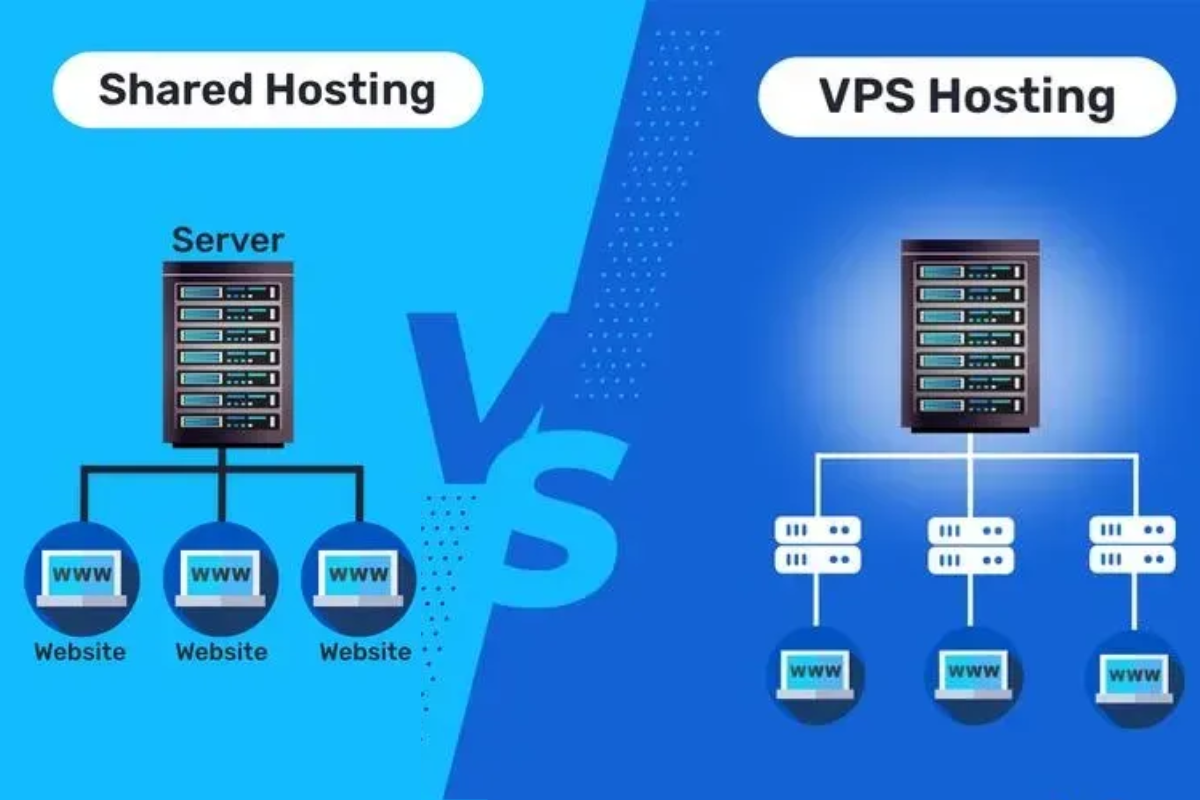
Shared hosting is one of the most basic and affordable hosting solutions. In this model, multiple websites share the same physical server and its resources. Think of it as living in a hostel or apartment – you have your own room (website space), but you share water, electricity, and kitchen (server resources) with others.
Key Features of Shared Hosting:
-
Affordable pricing (ideal for beginners)
-
Multiple websites share the same server
-
Limited control over server configuration
-
Hosting provider manages server maintenance
-
Easy to set up and user-friendly for beginners
Shared hosting is best suited for:
-
Personal blogs
-
Small business websites
-
Portfolio websites
-
Low-traffic sites
Comparison Table: Shared Hosting vs VPS Hosting
| Feature | Shared Hosting | VPS Hosting | Best For |
|---|---|---|---|
| Performance & Speed | Limited resources shared with many users → slower speed during high traffic | Dedicated resources (CPU, RAM) → faster and more stable performance | VPS → for growing websites needing stability |
| Security | Basic security, vulnerable if other sites on server are attacked | Stronger isolation with separate virtual environment → higher security | VPS → for eCommerce, business, or sensitive websites |
| Scalability | Limited; upgrading requires moving to another hosting plan | Highly scalable; can increase CPU, RAM, storage as site grows | VPS → for websites expecting growth |
| Customization | Minimal control; server managed by hosting provider | Full root access, install custom software, tweak server settings | VPS → for developers or advanced users |
| Server Resources | Shared with dozens/hundreds of other websites | Private virtual resources allocated to your website | VPS → when consistent performance is important |
| Uptime & Reliability | May face downtime if other sites overload server | More reliable; isolated environment ensures better uptime | VPS → for businesses needing 99.9% uptime |
| Ease of Use | Beginner-friendly, no technical skills required | Requires some technical knowledge (though many offer managed VPS) | Shared → for beginners; VPS → for advanced users |
| Customer Support | Standard support, often slower response due to shared issues | Premium/priority support available with managed VPS | VPS → for mission-critical websites |
| Best For | Personal blogs, small websites, portfolio sites | eCommerce stores, business websites, apps, and high-traffic blogs | Depends on your website’s size and growth |
| Cost | Cheapest hosting option | More expensive but better long-term investment | Shared → budget users; VPS → professional/business use |
Pricing Comparison (Approximate – 2025)
| Hosting Type | Starting Monthly Price | Recommended Use Case |
|---|---|---|
| Shared Hosting | ₹150 – ₹500 / month | Beginners, personal blogs, small sites |
| VPS Hosting | ₹700 – ₹3,500 / month | Business websites, eCommerce, growing sites |
👉 Quick Tip:
-
Choose Shared Hosting if you’re just starting, want low cost, and have low traffic.
-
Go for VPS Hosting if your website is growing, needs speed, security, and reliability.
2. What is VPS Hosting?
VPS (Virtual Private Server) hosting is a step up from shared hosting. In VPS hosting, a physical server is divided into several virtual servers using virtualization technology. Each VPS has its own dedicated portion of resources like CPU, RAM, and storage.
It’s like living in a gated apartment complex – you still share the building with others, but you have your own independent flat with dedicated resources and more privacy.
Key Features of VPS Hosting:
-
Dedicated portion of server resources
-
Root access and more customization options
-
Better performance compared to shared hosting
-
More secure environment
-
Ability to handle higher traffic
VPS hosting is best suited for:
-
Medium to large business websites
-
E-commerce stores
-
High-traffic blogs or news websites
-
Developers who need custom configurations
3. Shared Hosting vs VPS Hosting – Head-to-Head Comparison
Let’s look at the main differences between shared hosting and VPS hosting across various parameters:
| Feature | Shared Hosting | VPS Hosting |
|---|---|---|
| Cost | Low cost (₹100–₹500/month approx) | Higher cost (₹600–₹3000/month approx) |
| Performance | Limited, can slow down with high traffic | Consistent, faster, handles high traffic |
| Resources | Shared among multiple users | Dedicated resources for your site |
| Security | Basic, prone to risks due to sharing | High security, isolated environment |
| Customization | Limited, depends on hosting provider | Full root access and flexibility |
| Best For | Beginners, low-traffic websites | Growing businesses, e-commerce, high-traffic |
4. Pros and Cons of Shared Hosting
✅ Advantages:
-
Low Cost – Ideal for beginners and startups with a tight budget.
-
Beginner-Friendly – Comes with cPanel or similar dashboards.
-
Maintenance-Free – Hosting provider handles server maintenance.
-
One-Click Installations – Easy installation of WordPress and other CMS platforms.
❌ Disadvantages:
-
Performance Issues – If one site consumes more resources, your site may slow down.
-
Limited Resources – Not suitable for websites with heavy traffic.
-
Security Concerns – Vulnerabilities on other sites may affect yours.
-
Restricted Control – No advanced server customizations allowed.
5. Pros and Cons of VPS Hosting
✅ Advantages:
-
Dedicated Resources – Your website gets its own CPU, RAM, and storage.
-
Scalability – Can handle increased traffic by upgrading resources.
-
High Security – Isolated environment reduces hacking risks.
-
Full Control – Root access for custom configurations.
-
Better Performance – Faster loading speed and reliability.
❌ Disadvantages:
-
Higher Cost – More expensive than shared hosting.
-
Technical Knowledge Needed – May require server management skills.
-
Server Management Responsibility – Unless you choose managed VPS.
6. When Should You Choose Shared Hosting?
Shared hosting is perfect if you are:
-
Just starting your online journey.
-
Running a personal blog, portfolio, or small business site.
-
Expecting low traffic (below 10,000 visitors/month).
-
Looking for a budget-friendly hosting option.
👉 Example: A freelancer starting a personal website or a blogger testing their first blog should go for shared hosting.
7. When Should You Choose VPS Hosting?
VPS hosting is suitable if you are:
-
Running a professional business website.
-
Managing an e-commerce store where security is crucial.
-
Expecting high traffic (above 20,000 visitors/month).
-
Needing advanced server control and custom applications.
👉 Example: An online store selling fashion products or a news portal receiving thousands of visitors daily should go for VPS hosting.
8. Shared Hosting vs VPS Hosting – Which One Should You Choose?
The choice depends on your budget, website size, and growth plan.
-
Choose Shared Hosting if you are a beginner, running a personal blog, or don’t expect much traffic. It’s the most affordable and hassle-free way to get started.
-
Choose VPS Hosting if your website is growing, you run an online store, or you need better security and performance.
In simple words:
-
Shared hosting = small car for city rides 🚗
-
VPS hosting = SUV for long journeys and heavy loads 🚙
9. Future of Hosting in 2025 and Beyond
With the rise of cloud hosting, AI, and edge computing, both shared and VPS hosting are evolving. Many providers now offer hybrid hosting solutions, giving users a balance between affordability and performance.
For beginners, shared hosting will always be the starting point. But as your website grows, upgrading to VPS hosting (or even cloud hosting) becomes a natural step.
Conclusion
Both shared hosting and VPS hosting are excellent choices, but they serve different purposes. Shared hosting is perfect for beginners and low-budget users, while VPS hosting is ideal for growing websites that need more power, security, and flexibility.
👉 Before making a decision, consider:
-
How much traffic do you expect?
-
What’s your monthly budget?
-
Do you need advanced features or root access?
By answering these questions, you’ll easily know whether shared hosting or VPS hosting is the right fit for you.
